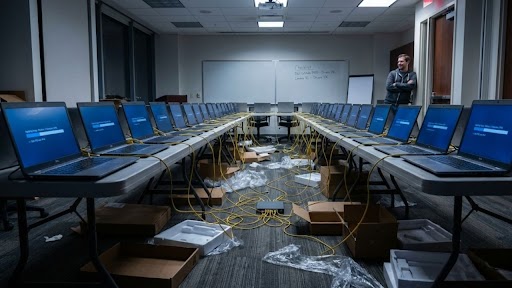
If you buy a new laptop for yourself, you turn it on, click “Next” a dozen times, create a user account, and spend hours downloading Chrome and Office. It’s tedious, but you only do it once.
Now, imagine a company hires 50 new sales reps starting on Monday. If you try to set up those 50 laptops manually, you will be there for a month. You will make mistakes. One laptop will have the wrong antivirus; another will be missing the PDF reader.
This is why the first thing you learn in a professional computer technician school is that you never build just one computer. You build a “Golden Image.” You become an architect who designs one perfect system and then clones it to the entire fleet in minutes.
The “Golden Image” Strategy
The process starts with a single machine. You take one laptop and make it perfect. You install the OS, the accounting software, the security patches, and the specific desktop background the CEO wants.
Once it is flawless, you don’t just copy it. You use a tool called Sysprep. What this does is strip out the unique identity of that machine—the serial numbers and specific ID codes—while keeping all the software intact. It turns the computer into a generic “template” that can be applied anywhere.
The Magic of PXE Boot (The Network Wake-Up)
So, you have your Golden Image on a server. How do you get it onto 50 blank laptops wrapped in plastic? You don’t use 50 USB drives.
To execute this deployment at scale, technicians rely on a Preboot Execution Environment, or PXE. This essentially allows the hardware to bypass the empty local drive and boot directly from the network interface to pull the image from the server.
Essentially, this workflow allows for the rapid provisioning of hardware en masse. By automating the deployment process, you ensure that dozens of workstations are standardized and ready for production within a fraction of the time it would take to configure them individually.
The Driver Injection Puzzle
The tricky part comes when the company buys different brands.
Like when you deal with hardware that isn’t identical, the system will basically fail to boot—usually ending in a BSOD—simply because the underlying drivers don’t match the actual hardware requirements, if you push an image meant for one chipset onto a completely different motherboard.
In computer technician programs, you learn about Driver Injection. Instead of separate images, you create a hardware-independent system that utilizes conditional logic during the deployment phase. The system queries the BIOS for the manufacturer and model, then pulls the specific driver packages from a centralized repository. You build one adaptable system that essentially ‘injected’ the required instructions for whatever hardware it touches.
The Verification Phase (The Audit)
A professional deployment doesn’t end when the progress bar hits 100%.
You actually have to confirm that the image deployment didn’t fail on a few specific machines due to local hardware quirks. It is a scripted check to make sure the machine actually joined the domain and pulled the right security policies. You don’t want a user calling you ten minutes after they get their laptop because they can’t log in.
The Verdict
The difference between a hobbyist and a pro is scale.
A hobbyist fixes problems one by one. Whereas the pro solves the problem once and automates the solution for everyone.
And thus, when you master the art of deployment, you will also stop being the person running around with a screwdriver and shift your value from manual labor to systems architecture.