Data loss rarely happens at a convenient time. A failed laptop, damaged external drive, or unresponsive server can quickly disrupt both personal and business activities. For organizations across Wellington and the wider Wairarapa region, losing access to critical files often means lost productivity, delayed projects, and unnecessary stress.
When evaluating SSD vs HDD data recovery, it is important to understand how each storage technology fails and how those failures affect recovery success rates. It will help you respond quickly and choose the right approach when data recovery becomes necessary, including when to engage professional Data Recovery Services in NZ.
Understanding How HDDs Store Data
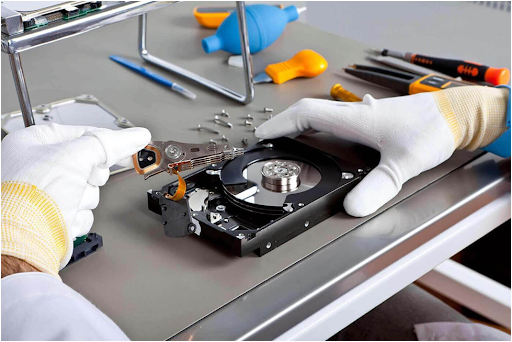
Hard disk drives use spinning magnetic platters to store information.
A mechanical read/write head moves across the platters to access files. Because HDDs rely on physical moving parts, they are vulnerable to:
- Head crashes
- Motor failure
- Shock damage
- Bearing wear
- Firmware corruption
Despite these risks, HDDs often remain highly recoverable because the underlying data frequently survives even after hardware failure.
Specialized recovery equipment can often access and extract information directly from the platters, making HDD recovery one of the more successful forms of professional data recovery.
This is one of the key reasons why SSD vs HDD data recovery comparisons often favour traditional hard drives when recoverability is the primary concern.
Understanding How SSDs Store Data
SSDs store information using NAND flash memory chips rather than spinning disks.
They offer:
- Faster performance
- Lower power consumption
- Better resistance to physical shocks
- Improved reliability in mobile devices
These advantages have made SSDs increasingly popular among New Zealand businesses and remote workers who rely on fast and reliable storage.
Understanding these technical differences is essential when assessing SSD vs HDD data recovery options after a storage failure.
However, SSD recovery introduces unique challenges.
Common SSD failures include:
- Controller failure
- Firmware corruption
- NAND degradation
- Electrical damage
- Power surge damage
Unlike HDDs, SSDs actively manage data through internal processes that can complicate recovery efforts.
Why SSD Recovery Is More Complex
Many users assume SSDs are easier to recover because they contain no moving parts.
In reality, in many SSD vs HDD data recovery scenarios, TRIM technology is one of the biggest factors that influences whether deleted files can be successfully restored.
TRIM automatically clears deleted data blocks to improve performance. Once TRIM executes, recovering deleted files becomes substantially harder because the data may no longer exist on the storage cells.
This process does not occur in the same way on traditional hard drives. For businesses throughout New Zealand, this means acting quickly after SSD failure is often critical to maximize recovery success.
When HDD Recovery Has Better Success Rates
Hard drives often provide warning signs before complete failure.
Examples include:
- Clicking noises
- Slow performance
- File corruption
- Read errors
These symptoms allow users to back up data or seek recovery assistance before catastrophic failure occurs.
Even severely damaged drives can sometimes be recovered through:
- Head replacement
- Firmware repair
- Sector imaging
- Platter recovery
For organizations comparing SSD vs HDD data recovery, hard drives often provide a larger and more affordable recovery window before data becomes permanently inaccessible.
When SSD Recovery Has Better Outcomes
Not all SSD failures are catastrophic.
Certain issues can be resolved successfully when:
- The controller remains functional
- Memory chips remain intact
- Firmware corruption is repairable
- Power-related failures are isolated
In these situations, professional recovery tools can often reconstruct data structures and retrieve critical files.
The key factor is obtaining an expert diagnosis before repeated power cycles create additional damage.
Which Device Fails More Often?
There is no universal answer.
HDDs experience higher rates of mechanical wear because they contain moving parts.
SSDs avoid many mechanical problems but introduce challenges related to memory cell degradation and controller failures.
The failure pattern is different, rather than necessarily better or worse.
Across New Zealand, many businesses now use SSDs for performance while maintaining cloud backups and external storage solutions for redundancy. This combination is particularly common among accounting firms, professional service providers, and small businesses throughout Wellington and the wider Wairarapa region.
Best Practices to Protect Your Data
Regardless of device type, several practices significantly reduce data-loss risk.
- Maintain Multiple Backups: Use both local and cloud backup solutions.
- Monitor Device Health: Storage monitoring tools can identify warning signs before failure occurs.
- Protect Against Power Surges: Quality surge protection reduces electrical damage.
- Replace Aging Storage Devices: Storage hardware should not be treated as permanent infrastructure.
- Act Quickly After Failure: Continued use of a failing device often reduces recovery success rates.
For New Zealand businesses operating across multiple locations or supporting remote teams, maintaining both onsite and cloud backups remains one of the most effective strategies for protecting critical business data.
When Professional Recovery Becomes Necessary
Recovery software can help in some deletion scenarios, but physical failures typically require specialized intervention.
Professional recovery providers use advanced imaging systems, firmware repair platforms, and hardware-level diagnostic tools to maximize recovery success while minimizing additional risk.
Storage failures affecting customer records, financial data, business databases, or project files often require specialist assistance, which is why businesses across Wellington, Masterton, the Hutt Valley, Carterton, and Wairarapa regularly engage providers such as Tech On Road for on-site data recovery and technical support when standard recovery software is no longer effective.
This becomes particularly important for:
- Business databases
- Client records
- Financial documents
- Family photographs
- Legal files
- RAID systems
Why Fast Recovery Matters for New Zealand Businesses
For many New Zealand businesses, data loss can have immediate operational consequences.
A failed SSD in a Wellington accounting practice, a damaged external drive used by a Masterton engineering firm, or a corrupted database supporting a Wairarapa retailer can quickly disrupt daily operations and impact customer service.
The longer a storage issue is ignored, the greater the risk of permanent data loss. Early diagnosis and professional assessment often improve recovery success rates while reducing business downtime.
The Real Cost Difference of SSD vs HDD Data Recovery
The cost of recovery depends less on whether the device is an SSD or HDD and more on the severity of damage.
Factors that influence pricing include:
- Type of failure
- Device capacity
- Encryption status
- Recovery urgency
- Physical damage level
- Required laboratory procedures
Understanding these variables helps users make informed decisions when evaluating recovery options.
The cost of SSD vs HDD data recovery can vary significantly depending on the complexity of the failure and the specialized techniques required. For a detailed breakdown of recovery pricing, device-specific costs, and recovery scenarios, a professional diagnosis is crucial.
Final Verdict
When evaluating SSD vs HDD data recovery, traditional hard drives often offer slightly better recovery opportunities because deleted and damaged data remains accessible for longer periods.
However, modern SSDs remain excellent storage solutions when paired with proper backup practices.
The most important factor is not whether the device is an SSD or HDD—it is how quickly users respond when data loss occurs.
Whether you’re a homeowner in Wellington, a business owner in Masterton, or an organization operating across the Wairarapa region, fast action, proper diagnosis, and professional handling consistently produce the best recovery outcomes regardless of storage technology.